When you shoot a video with your phone, what are you actually recording? A landscape, motion, or a string of photos one after another? In today’s article we look at this question from the engineering side. Don’t worry: we’ll build the idea first and bring in the math only where it’s needed.
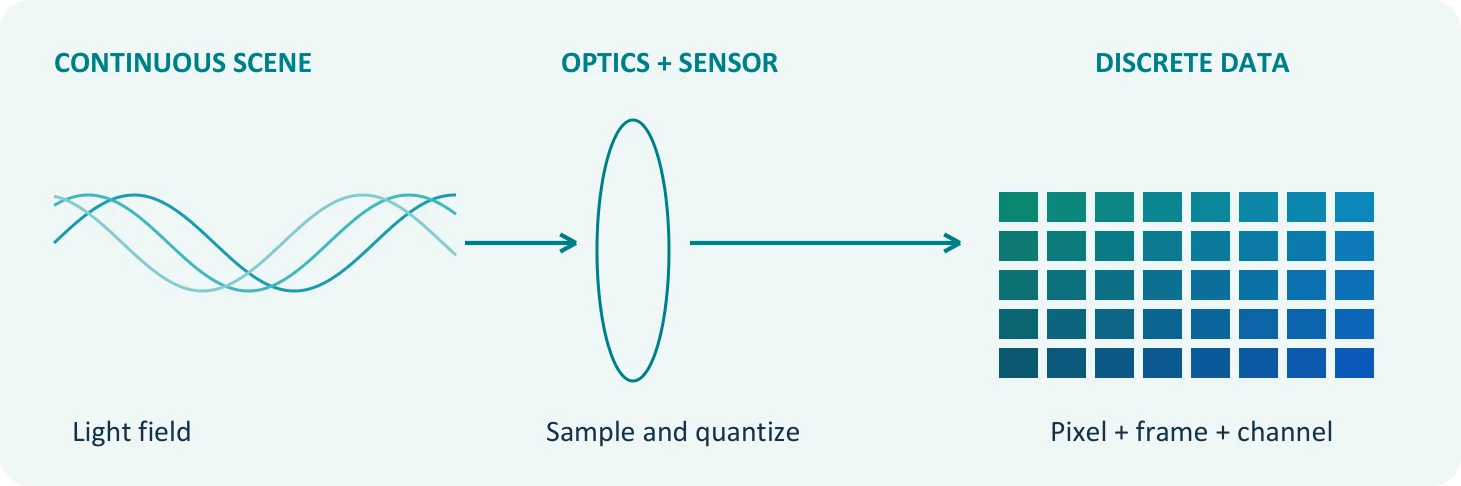
A camera cannot put the world into its box as it is. It selects one particular viewpoint from the light and turns that image into a limited number of measurements in position, time and color. In other words, our job is to fit a remarkably rich world into a finite number of bits.
So what are we choosing in this conversion?
The lens sets the viewpoint. The measurement points on the sensor limit spatial detail. The frame rate tells us how often we record change over time. And the color channels and bit depth determine how each measurement is represented.
Our starting point: Video is a representation of an image that is sampled in space and time, with quantized values. Put another way, it is the result of where, when and with what precision we take our measurements.
In this article we treat color, motion perception, sampling and data rate as links in the same chain. Basic electronics knowledge is enough; the formulas won’t get in the way of the main idea.
01 / TURNING LIGHT INTO NUMBERS
The world is continuous, our memory is finite
We can’t describe the light in a scene simply as “the brightness of this pixel.” Where does the light come from, which direction is it traveling, what is its wavelength, and how does it change over time? All of these matter.
For those who want a little math:
L(x, y, z, θ, φ, λ, t)
This notation describes the plenoptic function of seven variables: three for position, two for direction, plus wavelength and time. Conventional 2D video records a selected view of it.
| Information in the world | Its counterpart in conventional video |
|---|---|
| Viewing direction and depth | A 2D image in the perspective chosen by the lens |
| Wavelength distribution | Usually represented by three color channels |
| Position on the image plane | A sampling grid of rows and columns |
| Change over time | Frames captured at set intervals |
Are sampling and quantization the same thing?
Sampling means choosing where and when a measurement is taken. Quantization means representing the measured value with one of a finite number of levels. Imagine drawing a landscape on graph paper: the density of the squares limits the detail, while the number of shades in your pencil case limits how finely you can render transitions.
In the end, we can think of the data as V[m, n, k, c]: row, column, frame and channel. These four indices do not mean four spatial dimensions. The image varies along x and y, and over time along t; the color channel is a component added on top of these.
One more small detail: many color sensors do not measure all three colors at every point. The full-color image is formed by processing the measurements that come through the color filter array. We’ll discuss this in detail in the ISP article of the series.
02 / COLOR
Why do three color channels work for us?
The spectrum of sunlight and the spectrum of white on a display don’t have to be the same. Yet both can look white to us. Strange at first glance, isn’t it? At the heart of it is how our eyes perceive color.
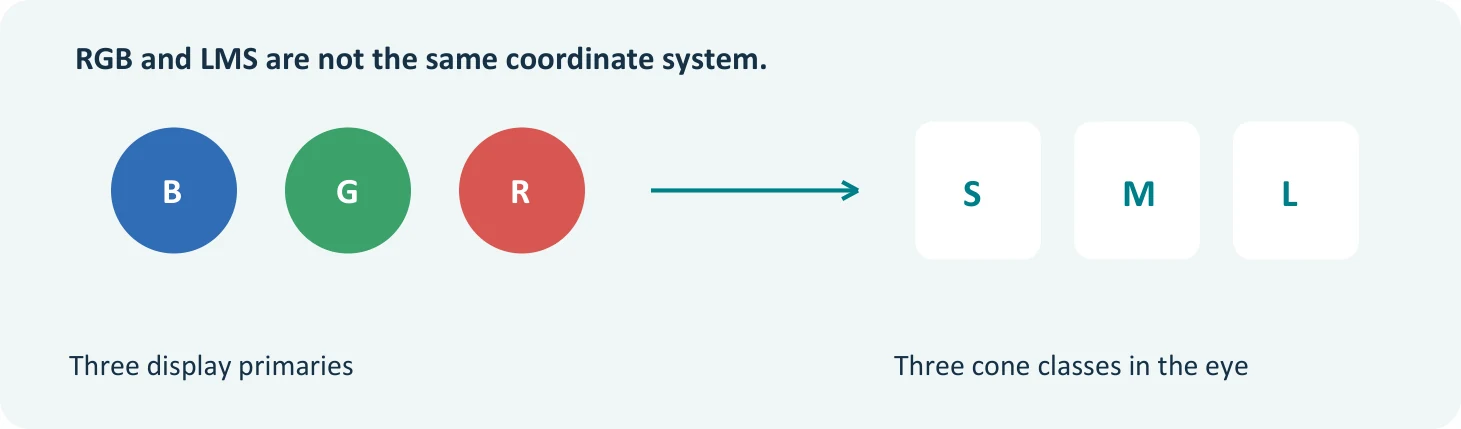
In normal trichromatic daylight vision, the S, M and L cone classes are sensitive to different wavelength ranges. These sensitivities are broad and they overlap. So we shouldn’t picture our eyes as containing three narrowband “RGB meters.” Variations in color vision fall outside this general model. [1]
Different spectra, similar color perception
Under given viewing and adaptation conditions, different spectra can produce the same cone responses. This is called metamerism. The fact that a display creates the right response in our visual system, instead of reproducing the entire light spectrum, explains the basis of color reproduction with three primaries.
The engineering view: Three suitable primaries can produce a great many colors, but any given display has a limited color gamut. It cannot be expected to reproduce every color in nature exactly, at every brightness.
Why might the camera and the eye disagree?
A camera’s filters and spectral sensitivities do not match the human cones exactly. Especially under different kinds of LED lighting, a face that looks natural to the eye can come out differently on camera. That’s why color is not settled at the level of “we’ve set the R, G and B values.”
In the color science article of this series, we’ll cover primaries, white point and transfer functions one by one. For now, it’s enough to know why three channels work.
03 / MOTION
Why do frames look like motion?
As a kid, did you ever draw little sketches in the corner of a notebook and flip through the pages quickly? Each page is still, yet the ball you drew seems to move. In video, too, successive images form a sequence suited to the way our visual system processes motion.
Explaining this only as “the image lingers on the retina for a while” falls short. Motion perception also involves neural mechanisms that process how the image changes in position and time. Seeing flicker and seeing smooth motion are different questions. [2]
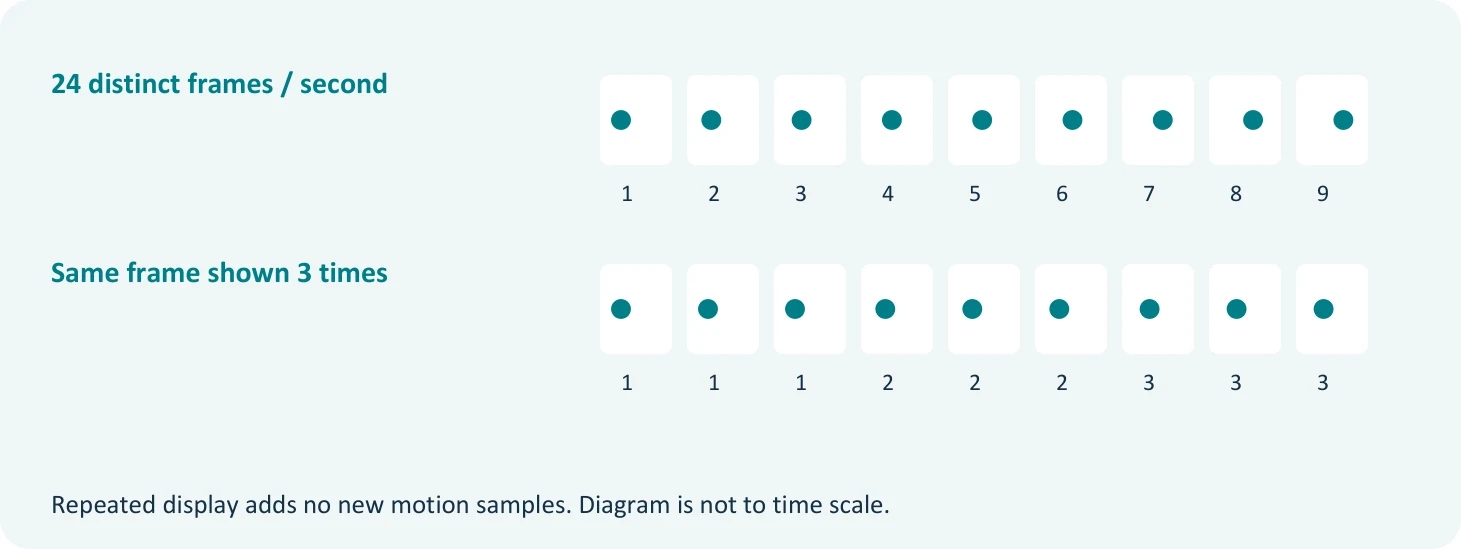
Does 24 fps mean the same experience under all conditions?
No. Camera movement, object speed, exposure time, the way the display operates and the viewing conditions all change the result. So it would be wrong to give a single threshold that holds for everyone, such as “anything above this frame rate is definitely smooth.”
In classic film projectors, a single frame can be shown with more than one flash of light. For example, a 24 frames/s recording can be presented at 72 flashes/s, with three flashes per frame. The new motion information is still at the 24 frames/s level. Modern displays, however, need not produce light the same way a projector does.
Keep in mind when designing: Frame rate, refresh rate and the modulation frequency of the light should not be used interchangeably. Showing the same number does not mean they describe the same thing.
04 / PERCEPTION
We don’t see every detail with the same sensitivity
We notice distortion in the contours of a face immediately, yet we can miss a small error in swaying grass. These perceptual differences matter when deciding which information to preserve in image coding.
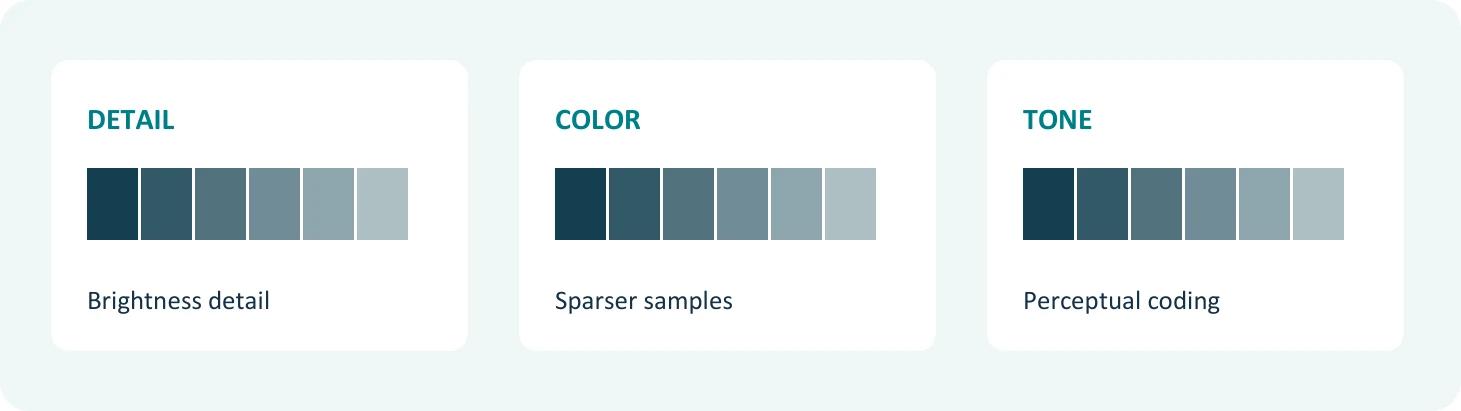
Brightness detail and color detail
Under many viewing conditions, we are more sensitive to fine brightness detail than to fine color detail. Chroma subsampling takes advantage of this difference. In 4:2:0, the number of samples for each chroma component drops to one quarter of what it is in 4:4:4. That is a 75% reduction in chroma samples, not a 75% reduction in all image data.
At the same bit depth, and excluding alpha and storage padding, the total sample payload is halved. The file size does not necessarily shrink by the same ratio. The loss can become noticeable in small colored text and at sharp color edges. [6]
Tones and contrast
Contrast sensitivity depends on the size of the detail, the brightness and the viewing conditions. Very fine detail is not invisible in every case; viewing distance is part of the equation too. That’s why compression has no standalone rule along the lines of “just throw away the high frequencies.”
Nonlinear encoding helps distribute the levels in a way that better matches perception. Luma (Y′) is a signal derived from nonlinear RGB components; it is not the same as physical luminance or perceived brightness. Nor are gamma, PQ and HLG the same function. [7, 8]
Masking: where the error sits matters
One pattern can make another pattern harder to notice; this is called visual masking. The effect depends on properties such as the frequency and contrast of the patterns. That’s why the same error can be noticeable to different degrees in different regions of an image. [9]
05 / SAMPLING
What a striped shirt and a spinning wheel have in common
You’ve probably seen wavy patterns appear on a finely striped shirt in a shot. Or a wheel that seems to spin backwards. In both cases, the sampling cannot adequately resolve the changes in the scene. The result is aliasing: different signals being represented by the same samples. [3]
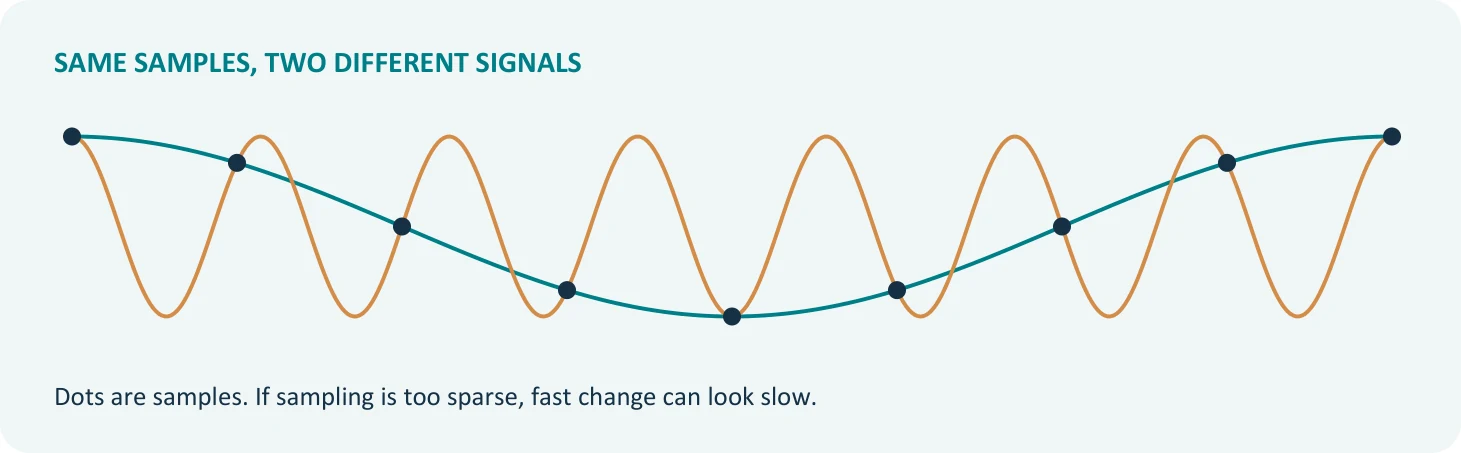
The basic condition: To ideally reconstruct a band-limited signal, the sampling frequency is chosen to be greater than twice the highest signal frequency: fs > 2fmax. A margin is also left for the transition band of real filters. [3]
In video, spatial sampling is tied to the pixel pitch on the sensor, and temporal sampling to the frame rate. The pixel clock describes the rate at which these samples are read out or transported; on its own, it is not the horizontal spatial sampling frequency.
So what’s the solution?
Before sampling, we attenuate changes that are too fast to be resolved. The optical low-pass filter, the combined response of the optics and the sensor, and, when resizing, suitable digital filters all play a part in this. Omitting the OLPF does not mean the aliasing risk goes away.
Exposure time integrates light over time, producing motion blur and reducing some temporal aliasing effects. At 24 fps, a 180° shutter angle corresponds to roughly 1/48 of a second. But this choice is not an ideal filter that prevents aliasing in every scene.
A note on interlace: The odd-line and even-line fields belong to different moments in time. So processing them as a single frame captured all at once can cause combing on moving edges. We’ll come back to this time difference in the second article.
06 / SIGNAL CHAIN
It’s a long way from camera to eye
Video doesn’t simply form in the camera and go straight to the display. Along the way there may be steps such as color conversion, compression, packaging and transmission. The chain below is a typical example; not every system needs to include every block separately.
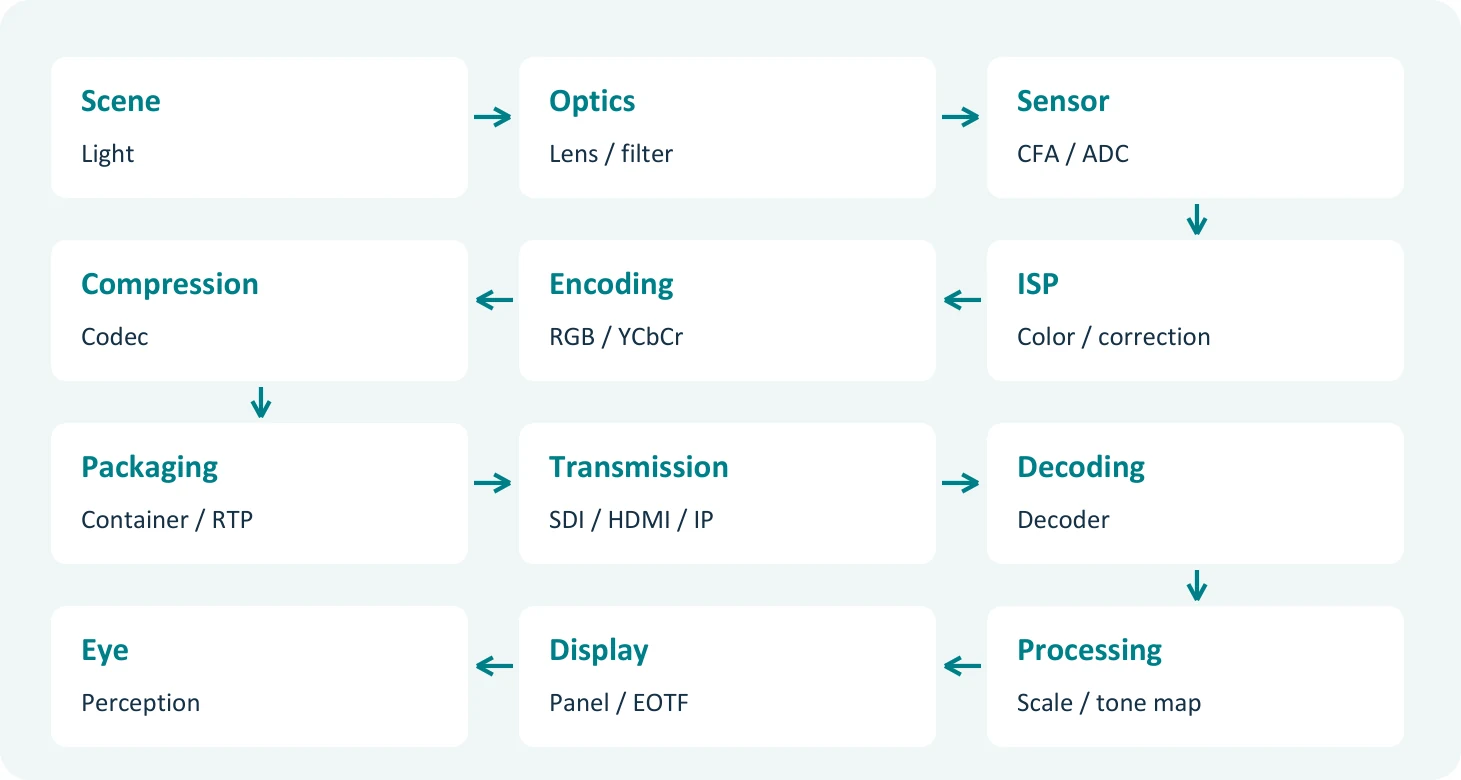
The blocks work, so why is the picture wrong?
Every block has to know how to interpret the data it receives. Knowing it is 1920 × 1080 is not enough on its own. If the color matrix, transfer characteristics, signal range or chroma siting is interpreted differently, the picture can change.
| Mismatch | Possible symptom |
|---|---|
| Full / limited range | Raised blacks or clipped tones |
| BT.601 / BT.709 matrix | Shifts, especially in skin tones and saturated colors |
| SDR / HDR interpretation | Wrong brightness and tonal appearance |
| Reversed interlace field order | A back-and-forth jumping feel in motion |
07 / FORMAT
Why isn’t saying “1080p video” enough?
Someone hands you a file and says, “It’s 1080p, it’ll work fine.” Great, but how many frames per second? Which color encoding? How many bits? For two devices to speak the same language, we need to pin down these details.
| Parameter | Example / notes | In the series |
|---|---|---|
| Active resolution | 1920 × 1080 | 2 |
| Scan type | Progressive or interlaced | 2 |
| Frame / field rate | 59.94 frames/s or fields/s, stated explicitly | 5 |
| Pixel / display aspect ratio | PAR 1:1 / DAR 16:9 | 2 |
| Color primaries | BT.709 | 3 |
| Transfer characteristics | E.g. BT.709; PQ / HLG are separate options | 3 |
| Matrix coefficients | BT.709, or the appropriate definition for RGB | 4 |
| Chroma format | 4:4:4 / 4:2:2 / 4:2:0 | 4 |
| Chroma sample location | E.g. horizontally co-sited | 4 |
| Quantization range | Full or limited | 4 |
| Bit depth | 10 bits per component | 4 |
| Timing / transport rate | Depends on the interface and video mode | 2, 6 |
A practical approach: When troubleshooting, start by checking that these definitions match at both ends. Swapping the cable sometimes helps, but on its own it cannot fix a wrong color interpretation.
This information may live in the file, in the interface or in the system configuration. FFmpeg defines color primaries, transfer characteristics and signal range separately, while RFC 4175 describes sampling, dimensions and color parameters for uncompressed video over IP. We can’t express all of this with a single “1080p” label. [10, 11]
BT.1886 is an EOTF definition on the display side; it should not automatically be treated as synonymous with the source signal’s transfer label. We’ll unpack this distinction in the color science article.
08 / DATA RATE
How much space does an hour of video take?
Now for the memory and bandwidth side of things. Let’s assume 1920 × 1080, 60 frames/s, 10 bits per component and 4:2:2 sampling. We’ll leave compression and additional transport overhead aside for now.
Step-by-step calculation:
1920 × 1080 × 60 = 124,416,000 pixels/s
4:2:2 at 10 bits: 20 bits/pixel on average
124,416,000 × 20 = 2.48832 Gbit/s
One hour: 2.48832 × 10⁹ × 3600 / 8 = 1.119744 TB
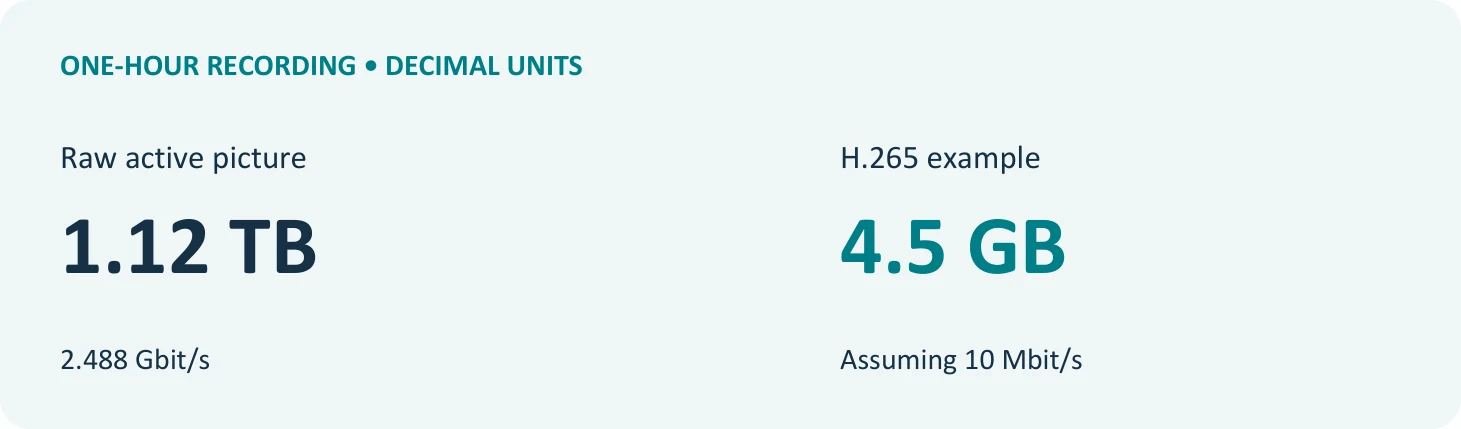
For 1080p60, the nominal 3G-SDI line rate is 2.97 Gbit/s. One hour’s worth of all line bits comes to about 1.34 TB. The active sample payload, the line rate and the file size are different things. For example, Y210 stores each 10-bit sample in a 16-bit field, so the file can be larger. [13, 14]
At an average video bit rate of 10 Mbit/s, one hour comes to about 4.5 GB, excluding audio and overhead. Relative to the active raw payload, the ratio is about 249. This is not a promise of compression at equal quality. TB and GB here are decimal units.
What should we take away from this article?
Video is the work of selecting light, sampling it, digitizing it and displaying it again. Color, motion, bandwidth and perception are parts of the same design. A decision in one affects the others. In the next article we’ll unpack pixels, resolution and scan geometry. Is a pixel really always square? Let’s pick up from there.
A print-ready version of this episode is also available: PDF version (10 pages, in Turkish)
References
- Stockman: Cone fundamentals and CIE standards
- Hoffman, Karasev, Banks: Temporal presentation protocols
- Stanford CS248A: Sampling and Anti-aliasing
- Adelson and Bergen: The Plenoptic Function
- Basler: PGI and demosaicing
- Microsoft: 8-bit YUV formats
- Poynton: Frequently Asked Questions About Color
- ITU-R BT.2100
- Heeger: Spatial Frequency Channels
- FFmpeg: pixel format definitions
- IETF RFC 4175: Uncompressed Video
- ITU-R BT.1886: Reference display EOTF
- Altera: 3-Gbps SDI Video
- Microsoft: 10-bit and 16-bit YUV formats
- Stanford: Sampling theory, aliasing
This episode is also shared as a document on Wupsoft’s LinkedIn page.